







Every feature, verified in public.
102 shipped features across seven modules and the shared platform — each linked to the page that explains it, with the plan it requires and any setup. Roadmap items stay marked as roadmap.
- Available
- 82
- Available, with limits
- 11
- Needs setup
- 9
- On the roadmap
- 9

Used by institutes, universities and educators across India




Four honest status labels.
Every row in the inventory below carries one of four commitments so buyers never guess whether something is live.
Works today. A plan name beside it means that plan or higher unlocks it.
Works today, with one caveat written directly on the row, such as no export yet.
Built, and needs one step outside the product first: our team, a provider account or DNS.
Planned, not built. Never counted in shipped totals and never sold as available.
CBT & Assessments
36- Nine question types
Single and multiple choice, true/false, numeric, assertion–reason, fill in the blanks, match, ordering and subjective.
Available - Equations, passages and media
Typeset equations, reading passages shared by several questions, and audio or video in a question.
Available - Folders, review status and versions
Questions by subject and topic, moved from draft through review to approved, with a version number on every change.
Available - Import from CSV or pasted text
Bring a bank in from a CSV file, or paste questions copied from a document, with duplicate detection.
Up to 500 rows per import; no Word or PDF upload.
Available, with limits - Up to 13 languages per question
Hindi, Bengali, Tamil, Telugu, Marathi and more, up to four per test; students switch language mid-exam.
Teachers write each translation.
Available - Learners report question errors
A learner can flag a question they think is wrong; staff review the report, add a note and fix the question.
Available - Templates by kind of test
Starting settings for school tests, competitive mocks, entrance exams, recruitment screens and certification quizzes.
Available - Sections, pools and shuffling
Timed or shared-clock sections, pools with difficulty quotas, optional sections, ‘attempt any N’ and shuffled questions and options.
Available - Negative marking and pass rules
Marks and penalties per question, section or test, partial credit, and pass rules overall and by section.
Available - Access windows, codes and devices
Open a test to chosen batches or candidates in a time window, with access codes, allowed devices and IP allowlists.
Available - Safe Exam Browser
Require Safe Exam Browser for a test, with its configuration keys checked by the server.
Available - Extra time for individual students
Accommodations per student are applied to every timed test they take.
Available - Test series with ranks across tests
Group mocks into a series with a leaderboard across every test in it.
Available - Paid tests and series
Sell a test or series on your portal with UPI, card or net-banking checkout and an invoice per sale.
Collected through Classify-X for 10% of each sale, or in your own Razorpay account with no commission.
Available - Practice mode
Practice tests let learners check each answer as they go, separate from scored exam attempts.
Available - Holds for overdue fees
With Institution Management, a student with an overdue installment can be held back from tests until it is paid.
Available - Computer-based exam screen
Question palette, mark for review, sections, a basic or scientific calculator and a scratchpad, as in computer-based entrance exams.
Independent of NTA and every exam body.
Available - Server-side timer and autosave
The clock runs on the server and answers save as they are marked, so a dropped connection resumes where it stopped.
Available - Locked published versions
Every attempt keeps the version of the test it started on; papers drawn at random can be reproduced for review.
Available - Browser integrity signals
Tab switches, leaving full screen, copy and paste, developer tools and extra displays are recorded against the attempt.
Available - Live monitor and evidence timeline
Invigilators watch attempts live, message, pause, extend time or end an attempt, and review a timeline of every signal.
StarterAvailable - Webcam evidence and on-device flags
Webcam frames and optional screen frames kept as evidence, with in-browser flags for no face, another person or a phone.
GrowthAvailable - Identity photo approval
Candidates take a photo before starting; an invigilator approves it. There is no automatic face matching.
GrowthAvailable - Continuous video proctoring
Recorded video of the whole attempt.
On the roadmap - Printable OMR sheets
QR-coded answer sheets on plain A4, up to 225 four-option questions per sheet.
Available - Read from a phone photo or scan
Photograph sheets with a phone or upload a scanner PDF; the server reads them into the same results as online tests.
Available - Unclear marks to a person, key changes re-grade
Doubtful bubbles go to staff instead of being guessed, and changing the answer key re-grades every sheet.
Available - Your own sheet designs
Use an existing OMR sheet layout.
Reading roll-number bubbles on custom sheets is not built yet.
Available, with limits - Results when you choose
Release scores, ranks and percentiles at once, on a schedule or by hand.
Available - Leaderboards with privacy
Six modes, from hidden to full names, short names, roll numbers or anonymous ranks.
Available - Test analytics
Score distribution, average and median, pass rate, section averages and accuracy by topic and difficulty, weakest first.
Available - Item analysis
Difficulty and discrimination for every question after every exam.
GrowthAvailable - Subjective marking queue
Long answers marked in a queue, with re-marking that records the reason.
Available - Exports and scorecards
Results in Excel and PDF, a scorecard PDF per attempt and leaderboards as CSV.
Available - Saved questions for revision
Learners save questions from their attempts to revise later.
Available - Previous-year paper library
A ready library of past papers to practise on.
On the roadmap
Classify-X LMS
12- Courses, sections and lessons
Text, video, link, file and assignment lessons in an outline learners follow on any device.
Available - YouTube and Vimeo lessons
Videos play inside the lesson (YouTube in privacy-enhanced mode).
No video hosting or DRM.
Available, with limits - Free preview lessons
Mark lessons anyone can open before they enrol or buy.
Available - Enrol a whole batch
Enrol a batch once; students who join it later are enrolled too.
Uses Institution Management batches.
Available - Self-enrolment
Let every active student join a course on their own.
Available - Progress and course analytics
Lessons completed for each learner and course-level analytics.
Available - Assignments with feedback
Learners hand in work; teachers grade, comment and return it.
No due dates yet.
Available, with limits - Verifiable certificates
A code and QR on every certificate, checkable on a public page; premium designs are one-time add-ons.
LMS StarterAvailable - Paid courses
Learners pay online and are enrolled straight away, with an invoice for every sale.
LMS StarterAvailable - Live classes
Teach on the built-in classroom, your Zoom account or YouTube Live, scheduled from a course or batch.
Ask us to confirm the classroom provider for your workspace.
LMS GrowthNeeds setup - Attendance and recordings from live classes
Attendance taken from who joined, recordings returned to the lesson, reminders 60 and 10 minutes before.
Needs the live-class provider to be set up.
LMS GrowthNeeds setup - Coupons, bundles, drip content, discussions, SCORM
Selling and engagement tools for course businesses.
On the roadmap
Institution Management
15- Enquiry pipeline
Walk-ins, calls and web enquiries on one board from new to admitted, with counsellors, sources, follow-up dates and duplicate detection.
Available - Enquiry form on your portal
An optional public form that drops enquiries straight onto the board.
Available - Admissions and student records
Admission numbers, batches and status for every student; import up to 1,000 from a CSV.
Available - Documents and ID cards
Store documents on each student and print ID cards.
Institution Starter (ID cards)Available - Sessions, campuses, classes and batches
Academic sessions, several campuses, and classes or batches with capacity.
Available - Student attendance
Present, absent, late or excused for each batch and day, with ‘mark the rest present’ and the last 30 days alongside.
Available - Absence alerts
Tell students and parents about an absence by e-mail and in the app.
Off by default; SMS and WhatsApp are not switched on yet.
Available, with limits - Timetable without clashes
Weekly classes with subject, teacher and room; a clash with the same batch, teacher or room is refused.
Available - Fee structures and installments
Installments, concessions and each student's dues, with the oldest overdue date first.
Available - Fee reminders
Remind everyone with dues, or one student, in one click; staff send them, at most once a day.
Available - Online fee payment
Students and parents pay installments online in the learner portal.
Institution StarterAvailable - Receipts and refunds
Numbered receipts, with GST and the CGST/SGST split once your GSTIN is set; full or partial refunds.
Available - Tally export
Fee transactions as Tally XML for your accountant.
Institution GrowthAvailable - Accountant and branch manager roles
Ready-made roles for the front office and accounts.
A branch manager sees every campus; per-campus access is not built.
Available, with limits - Grade books, report cards, TC and CC
Term exams, report cards and transfer or character certificates.
On the roadmap
Corporate Training
10- Employees and departments
Import employees from CSV into a department tree, with managers, leave status, exits and rehires.
Available - Sign-in with employee ID
Employees sign in to the learner portal with their employee ID or e-mail.
Available - Onboarding, compliance and skills programmes
Ordered courses, tests, live sessions, documents and links, assigned by department with a due date.
Available - Recurring mandatory training
Yearly, half-yearly or quarterly repeats re-assign training automatically.
Available - Daily reminders
An e-mail every day to anyone overdue or due within 7 days, or send them now.
Employees without an e-mail are skipped.
Available - Knowledge checks inside programmes
A released, valid CBT result completes the programme item.
Give employees access to the test in CBT; proctoring needs the workspace Growth plan.
Available, with limits - Compliance by programme and department
Assigned, completed and overdue counts for every mandatory programme.
On screen; no export yet.
Available, with limits - Skills matrix
Levels 1 to 5 for each employee and skill, with the gap for each team.
Corporate GrowthAvailable - Certifications with expiry
Certifications granted by hand or by a programme, tracked to their expiry date.
Available - SCORM import, HRMS sync and compliance export
Bring in course packages, sync people from HR and export compliance.
On the roadmap
Events & Webinars
7- Public, unlisted or private events
Each webinar, workshop or open day gets a registration page guests can use without an account.
Available - Capacity and waitlist
When someone cancels, the next person on the waitlist moves up.
Available - Reminders and calendar files
E-mail reminders a day before, an hour before and at the start, with a calendar file.
Available - Paid tickets
Charge for a workshop through Razorpay with an invoice per ticket.
Signed-in learners only; guests can't buy yet.
Events StarterAvailable, with limits - Attendance online and at the door
Attendance from connected time when you host online, or check people in at the door.
Available - Events GrowthNeeds setup
- Polls, Q&A, attendance certificates, coupons
Engagement and ticketing extras.
On the roadmap
Classify-X Store
6- Catalogue with GST and HSN
Variants, SKUs, barcodes, bundles, digital items, HSN codes and GST rates, imported from CSV.
Available - Stock ledger
Purchases and adjustments in one ledger, with low-stock flags; transfers between locations on Store Growth.
Available - Counter sales
Scan or search, pick the student or a walk-in buyer, record cash, UPI or card, or add the sale to the student's fees.
Available - Online shop in the portal
Students order for pickup, or courier delivery on Store Growth with the tracking number you enter.
Store StarterAvailable - Issue material by batch
Hand a term's books to a whole batch, respecting fee holds.
Available - Returns and reports
Returns, digital downloads, and sales and stock reports by item and location.
Available
Classify-X AI
5- AI question drafting
Up to 10 single-choice, multiple-choice, true/false or numeric questions per request, in English or Hindi, with answers and worked solutions.
Switched on per workspace by our team.
Needs setup - Checked before it reaches you
Structure, answer key, marks, equations and exact duplicates are checked; a person still checks the answers are right.
Part of AI drafting, switched on per workspace.
Needs setup - Drafts until a person publishes
AI output lands in the library as drafts tagged ai-draft; tests use only published questions.
Part of AI drafting, switched on per workspace.
Needs setup - Permission, budget and audit
Only roles with “Use AI assistance” can draft; each workspace has a monthly budget and every run is in the audit log.
Part of AI drafting, switched on per workspace.
Needs setup - Lesson summaries and assessment insights
Summaries of LMS lessons and insights across a class's results.
On the roadmap
Platform and portal
20- One record per person
Students, candidates, employees, attendees and buyers appear once, with every application they use beside their name.
Available - Roles and custom roles
Thirteen ready-made roles from owner to store keeper, plus custom roles built only from permissions you hold.
Available - Search across the workspace
One search box in the Console finds people, tests, questions, students, enquiries and fee receipts your role can see.
Available - Notices with read counts
Announcements to everyone, a batch or your staff, in the app inbox and by e-mail, scheduled, with read counts.
Available - SMS and WhatsApp
Text channels for notices, fees and absence alerts.
Built, not switched on for customers yet.
On the roadmap - Exports
Results, registrations, finance and reports in Excel or CSV.
No question-bank or full-workspace export yet.
Available, with limits - Sample content and a setup checklist
A new workspace opens with sample content, a checklist and a 14-day trial of the Growth plan.
Available - Your name, logo and colours
Your branding on every learner screen and e-mail, without the ‘powered by’ badge.
StarterAvailable - Your own domain
Every workspace has a Classify-X address; connect your own domain and HTTPS is set up for you.
You add the DNS records.
StarterNeeds setup - Online payments
Through the platform's Razorpay account for 10% of each sale (never on fees), or straight into your own Razorpay account with no commission, where Razorpay charges you its own gateway fee.
Available - An invoice for every sale
Learners get an invoice in your name, a GST tax invoice once you add your GSTIN.
Available - Tenant isolation
Your organisation is resolved on the server, every query is filtered by it and the database refuses cross-organisation references.
Available - Two-factor sign-in
Authenticator codes with backup codes for staff on every plan; require them for owners and admins.
Available - Single sign-on for staff
OIDC or SAML with your identity provider, after you prove your domain.
Needs your identity provider and a DNS record.
EnterpriseNeeds setup - Tamper-evident audit log
Administrative actions recorded in a hash-chained log; viewing and verifying it comes with Growth.
Growth (to view)Available - Learner portal on any phone
Courses, tests, results, timetable, attendance, fees, events and the store in the phone's browser; nothing to install.
Available - Parent portal
Attendance, fees and payment, receipts, released results and events, with one login for siblings.
The sign-in code goes by text, which isn't switched on yet; parents with an e-mail get it there.
Available, with limits - Your own sign-in link and QR
Learners join through your institute code, link or QR code.
Available - Public certificate verification
Anyone can check a certificate's code on a public page.
Available - On the roadmap
Start from who you teach.
Each solution page filters this exact inventory to the capabilities schools, institutes, universities, trainers and exam bodies use most.
What Classify-X does not build.
Asked about often, not in the product today, and not on the near roadmap. If one of these decides your purchase, tell us on a call and we’ll give you a plain answer.

We focus deeply on assessments, teaching, admissions, fees and training — rather than half-built ERP modules.
Outside current scope
10 items- Staff attendance
- Homework diary
- Library management
- Transport and vehicles
- Hostel management
- Staff leave and payroll
- Timetable substitution
- Visitor management
- Question-bank export
- Public developer API and webhooks
Questions about scope and plans.
Yes. CBT, LMS, Institution Management, Corporate, Events & Webinars and Store each have their own plans. CBT comes with the workspace plan, which starts free; most other applications have a free tier, and every paid plan has a 14-day trial.
Classify-X for Windows.
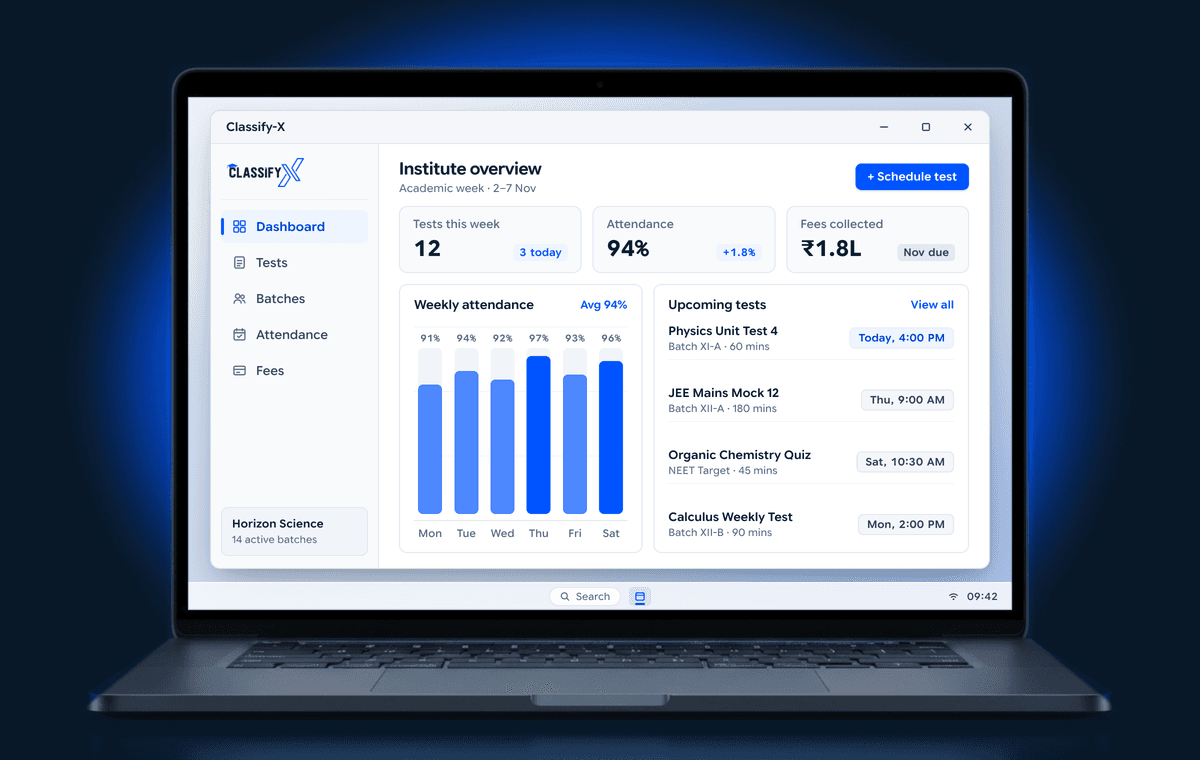
Tests, batches, attendance and fees in a desktop app for your staff computers. Leave your e-mail and we’ll tell you the day it’s out.

Need a feature walkthrough?
Tell us how your institution runs. We’ll demonstrate the exact workflows on live screens — and state plainly which plan or setup each one needs.